




15
+
YEARS OF
EXPERIENCE
1000
+
SUCCESSFUL
Projects
80
+
Satisfied
Clients
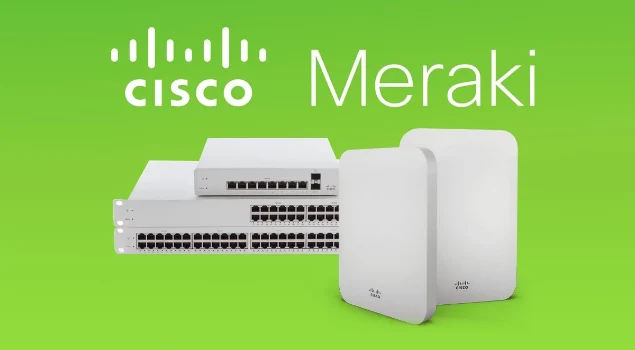
In an era where businesses are increasingly dependent on seamless connectivity and robust IT infrastructure, Meraki by Cisco offers a simple yet powerful solution for office networks. Meraki’s cloud-managed IT systems enable businesses to deploy, manage, and scale their office networks with ease. Whether you’re a small startup or a large enterprise, Meraki office designs provide the tools and flexibility necessary to create a reliable, secure, and efficient network that grows with your organization.
This guide explores the core components of Meraki office designs, their key benefits, and how businesses can leverage Meraki solutions to build a modern, future-proof office network.
What is Meraki Office Design?
Meraki office design refers to creating a network infrastructure for an office environment using Meraki’s suite of cloud-managed IT products. Meraki solutions are designed to simplify the deployment and management of networking hardware like routers, switches, wireless access points (APs), security cameras, and more—all managed through a central cloud-based dashboard.
Meraki’s cloud-managed approach is ideal for businesses that want to minimize the complexity of traditional network management while ensuring high performance, security, and scalability. Whether you have a single office location or multiple offices, Meraki office designs provide the flexibility to manage all your IT systems from anywhere, at any time.

Key Components of Meraki Office Designs
Meraki offers a wide range of networking and security solutions to meet the demands of modern office environments. Here are the key components that form the backbone of any Meraki office design:
1. Meraki Wireless Access Points (APs)
In today’s mobile-first world, a reliable and high-performance wireless network is crucial for any office. Meraki’s Wireless Access Points (APs) are designed to deliver fast, secure, and scalable Wi-Fi coverage. Meraki APs use advanced technologies like Wi-Fi 6 to offer faster speeds, improved range, and better performance in dense environments.
Meraki offers a range of access points that can be easily deployed and managed through the Meraki Dashboard. Features like automatic channel selection, band steering, and load balancing ensure that your wireless network adapts to the needs of your office environment. Meraki also allows you to create multiple SSIDs for guest access, employee networks, and IoT devices, all with separate security policies.
2. Meraki Switches
Meraki’s Switches are an essential component of any office network, providing reliable connectivity between devices, servers, and other network components. These switches are designed for high performance and ease of management, offering both Layer 2 and Layer 3 switching capabilities.
Meraki switches come in various models with features like Power over Ethernet (PoE), allowing you to power devices like IP phones, security cameras, and access points directly through the network cable. The Meraki Dashboard makes it easy to monitor switch performance, configure VLANs, and troubleshoot connectivity issues remotely.
3. Meraki Security Appliances (MX)
Meraki’s Security Appliances (MX) are all-in-one solutions that provide advanced security features such as firewall protection, intrusion detection, VPN support, and content filtering. These appliances are designed to protect your office network from threats while ensuring seamless connectivity for employees.
With Meraki MX, businesses can implement Secure SD-WAN capabilities, which allow for better control of network traffic across multiple office locations. Meraki MX devices are easy to set up and manage, with cloud-based tools that automatically update security settings, reducing the administrative burden for IT teams.
4. Meraki Cameras (MV)
For businesses that need to ensure the physical security of their office space, Meraki’s MV security cameras offer a robust solution. These cloud-managed cameras provide high-definition video surveillance, with features such as motion detection, cloud storage, and smart analytics.
Meraki cameras integrate seamlessly with other office devices and can be easily managed from the Meraki Dashboard, allowing you to monitor video feeds remotely and receive alerts when unusual activity is detected. With the ability to set up camera networks for different areas of the office, you can ensure that your business premises are secure at all times.
5. Meraki Mobile Device Management (MDM)
As the workforce becomes more mobile, managing devices—whether company-issued or BYOD (Bring Your Own Device)—is essential. Meraki’s Systems Manager (MDM) enables businesses to manage and secure mobile devices, laptops, and desktops from a centralized cloud platform.
Through Meraki’s MDM solution, you can remotely deploy applications, enforce security policies (e.g., encryption, password policies), and track device location. This is crucial for keeping your devices secure, ensuring compliance, and managing app deployments across your organization.
6. Meraki Insight and Analytics
Meraki’s Network Insight and Analytics tools allow businesses to monitor network performance, track usage patterns, and identify potential issues before they impact productivity. With real-time insights into the health of your office network, Meraki enables IT teams to troubleshoot and resolve network issues efficiently.
Meraki’s cloud-based analytics tools also provide detailed reports on bandwidth usage, device performance, and application traffic, helping businesses make informed decisions about network optimizations and capacity planning.
Network and Connectivity
Reliable network and connectivity solutions to ensure seamless communication, secure data transfer, and optimized performance.Cisco Enterprise Designs
Custom Cisco enterprise designs tailored to meet business needs, ensuring scalable, secure, and high-performance networks.Wifi Entra ID Authentication
Integrate Wi-Fi with Entra ID for secure, seamless authentication, ensuring secure access across all devices.
Benefits of Meraki Office Designs
1. Simplicity and Ease of Use
One of the standout features of Meraki office designs is their simplicity. The Meraki Dashboard provides a centralized interface to manage all your devices, from switches and APs to security appliances and cameras. With intuitive controls, businesses can deploy new devices, monitor performance, and troubleshoot issues without the need for specialized IT knowledge.
Meraki’s cloud-based approach removes the need for on-premise hardware and software management, making network administration much easier and more accessible. Whether you’re an IT professional or a business owner with limited technical experience, Meraki’s user-friendly tools make network management straightforward.
2. Scalability
Meraki office designs are inherently scalable. Whether you’re adding new employees, expanding to a new office, or rolling out new IoT devices, Meraki’s cloud-managed solutions allow you to scale your network easily. With just a few clicks, you can add new devices, configure additional access points, or update security settings across your entire network.
Meraki’s flexibility also means that businesses can choose from a range of devices to fit their specific needs, whether it’s upgrading your Wi-Fi coverage or expanding your network security capabilities.
3. Security
Security is a top priority for any office network, and Meraki’s solutions are designed with advanced security features built-in. From robust firewall protection on Meraki MX appliances to end-to-end encryption for wireless traffic, Meraki ensures that your office network is protected from external threats.
Meraki’s content filtering, VPN support, and intrusion prevention features allow businesses to create secure, policy-driven networks that meet compliance requirements and safeguard sensitive data.
4. Remote Management
Meraki’s cloud-based management allows businesses to manage and monitor their office networks from anywhere, at any time. This is especially beneficial for businesses with remote or distributed teams, as IT teams can make real-time changes, troubleshoot issues, and maintain network health from any device with internet access.
The ability to monitor office networks remotely also helps reduce response times to network problems and allows IT staff to be more proactive in addressing issues before they affect employees.
5. Cost Savings
Meraki’s cloud-managed devices can help businesses reduce the costs associated with traditional networking solutions. With simplified deployment, minimal on-site hardware, and the ability to remotely manage devices, Meraki eliminates the need for extensive IT staff and ongoing maintenance expenses.
Moreover, Meraki’s license-based pricing model means businesses only pay for what they use, and the total cost of ownership is significantly lower than traditional networking solutions.




Conclusion
Meraki office designs offer businesses a powerful, easy-to-manage network solution that is both scalable and secure. By leveraging Meraki’s cloud-managed Wi-Fi, security appliances, switches, and mobile device management, businesses can simplify their IT infrastructure while improving performance and security. With the added benefit of remote management and real-time analytics, Meraki makes it easy for businesses to stay ahead of their network needs, all while reducing operational costs and complexity.
Whether you’re a growing startup or an established enterprise, adopting Meraki office designs can help you create a network that is reliable, flexible, and ready for the future.



answer time
satisfaction
score
on initial call
same business
day